
Primary keyword: Qwen Image 3.0 text rendering

Qwen Image 3.0 Text Rendering Guide

A practical method for prompting, testing and reviewing Chinese, English and multilingual text in posters, interfaces, infographics and product graphics.

Current status

The official Qwen Image 3.0 announcement reports legible text near 10px, native rendering in 12 languages and complex layouts from prompts up to 4.5K tokens. Those are capability claims, not permission to skip proofreading: names, prices, formulas and legal copy still need human verification.

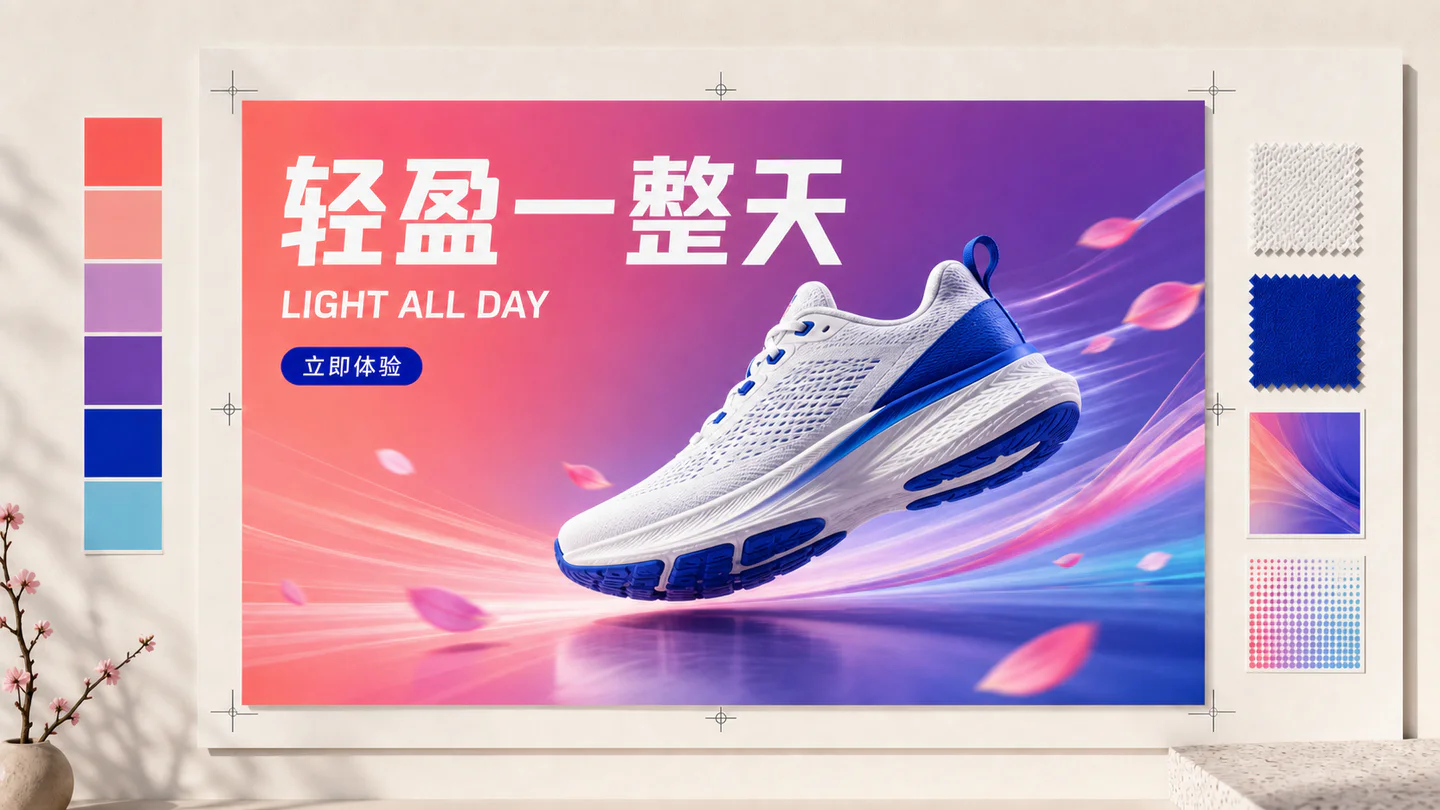
Illustrated multilingual running-shoe poster case with Chinese headline, English subheading and Chinese call to action

Illustrated case

Design text as a hierarchy, then proofread

Specify every string verbatim, assign one role to each line, and describe alignment, scale and contrast. Review characters at 100% zoom, regenerate only the failing region when possible, and typeset legal or price-critical copy afterward.

Illustrative workflow image—not an unedited Qwen output or a benchmark result. Use it to understand the method, then validate your own prompts and check the linked official sources.

01

Start with an exact-text prompt contract

Separate required copy from the visual description. Put every required line in quotation marks, specify language, capitalization, line breaks, location and relative size, then say that no additional text should appear. Short copy is easier to verify than a paragraph.

  • Headline: exact quoted text and maximum line count
  • Hierarchy: headline, supporting line, label and CTA
  • Placement: top-left, centered panel or product-side column
  • Exclusion: no extra letters, logos or watermarks
02

Use a repeatable Qwen Image 3 text test

Test the same copy across square, portrait and landscape canvases with a fixed seed when available. Include uppercase and lowercase English, simplified Chinese, numbers, punctuation and one mixed-language line. Save the prompt and output so later model changes can be compared.

  • Short headline with common words
  • Price, date, percentage and decimal punctuation
  • Chinese product name plus English subtitle
  • Dense caption at the smallest publishable size
03

Design layouts that give text enough space

Text accuracy depends partly on composition. Reserve a quiet panel, request high contrast and limit competing decoration behind copy. For an infographic, name the number of sections and reading order instead of asking for a generally complex page.

  • Keep one clear reading direction
  • Use generous margins around small text
  • Avoid textured backgrounds behind critical copy
  • Split overloaded pages into a series when necessary
04

Review multilingual text character by character

Native multilingual rendering is useful for localized campaigns, but language support does not guarantee accurate translation or brand terminology. Provide approved copy in each target language and have a fluent reviewer check characters, spacing, direction and cultural fit.

  • Do not ask the image model to invent legal translations
  • Lock brand names and product codes exactly
  • Check accents, punctuation and numeral conventions
  • Generate each locale separately for easier review
05

Score accuracy separately from visual appeal

Use a review sheet with exact copy accuracy, missing or extra text, hierarchy, legibility at final size and overall visual quality. Reject an attractive poster when the price or product name is wrong. This keeps subjective design taste from hiding business-critical errors.

  • Exact-copy score: every required character matches
  • Completeness score: no missing or invented labels
  • Legibility score: readable at actual placement size
  • Brand score: palette, logo treatment and tone comply
06

Use a production-safe correction workflow

Regenerate when text errors are widespread or composition must change. For one small correction, use an approved design editor rather than repeatedly paying for full generations. Keep editable source copy outside the image and archive the reviewed final asset with its locale.

  • Proofread before resizing or compressing
  • Keep the approved copy in the task record
  • Do not publish generated citations or formulas unchecked
  • Retest templates after a model or provider update
07

Copy this multilingual poster test prompt

Create a clean vertical launch poster with one centered product and a quiet text panel. Render the Chinese headline "轻盈一整天" on line one, the English subtitle "LIGHT ALL DAY" on line two, and the CTA "立即体验" at the bottom. Preserve this exact spelling and line order, use no other words, keep strong foreground-background contrast, generous margins and a simple editorial grid.

  • Run once at 4:5 and once at 9:16
  • Check every Chinese character and English letter
  • Inspect the final mobile display size, not only the full image
  • Save the output as a regression baseline

Frequently asked questions

Can Qwen Image 3.0 render small text?

The official announcement reports precise rendering near 10px. Actual legibility still depends on canvas size, layout, language and output processing, so test at the final display size.

Can Qwen Image 3.0 generate Chinese text?

Yes. Provide exact Chinese copy in quotation marks, reserve a clear text region and review every character before publishing.

How many languages does Qwen Image 3.0 support?

Qwen's official release states native rendering support for 12 languages. The announcement does not remove the need for fluent review of translation and typography.

What is the best prompt for text in a poster?

State the poster purpose, canvas, hierarchy and exact quoted copy. Specify language, position, maximum lines, contrast and no extra text, then describe the visual style.

Should prices and legal text be generated inside an image?

Only if a human checks them. For high-risk or frequently changing copy, generate the visual background and add approved text in a design tool.

How do I compare Qwen Image 3 text accuracy?

Use a fixed set containing names, numbers, punctuation, Chinese, English and mixed-language copy. Save prompts, settings and outputs, then score exact characters and final-size legibility.

Continue reading

Browse all Qwen Image 3.0 guides

Try the guided image workspace

Start with a plain-language prompt, choose a format, and refine the result from your private studio.